
documentation:software:ohdsi-in-a-box
This is an old revision of the document!
OHDSI-In-A-Box
OHDSI-In-A-Box is a virtual machine containing the full OHDSI Technology Stack as well as several of the OHDSI tools. It was constructed as a resource to supplement tutorials held during the 2016 OHDSI Symposium. It also functions as a learning aid and sandbox environment for those who want hands-on experience with OHDSI.
Minimum System Requirements
- 8GB RAM
- 45GB available disk space
- Oracle VM Virtual Box
Setup Procedure
- Download and install the appropriate VirtualBox binaries link
- Download and unzip ohdsi-in-a-box.zip link
- Unzip ohdsi-in-a-box.zip to extract ohdsi-in-a-box.vdi
- Create an Ubuntu virtual machine using ohdsi-in-a-box.vdi
- Open Oracle VM VirtualBox Manager and click “New”

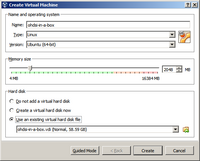
- In the Create Virtual Machine dialog enter the following parameters:
- Name: ohdsi-in-a-box
- Type: Linux
- Version: Ubuntu (64-bit)
- Memory size: 2048 MB
- Hard Disk: Use an existing hard disk file (navigate to the unzipped file ohdsi-in-a-box.vdi)
- Click Create
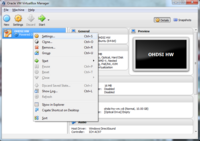
- A new entry ohdsi-in-a-box will appear in VirtualBox Manager. Right-click on the entry and select the menu item Settings.
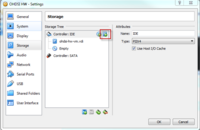
- In the Settings dialog go to the Storage section and ensure that ohdsi-in-a-box.vdi appears as a hard disk under Controller: IDE within the Storage Tree. (If it is under SATA, remove it and add it under Controller: IDE.)
- Click OK to close the Settings dialog.
- Double-click the entry ohdsi-in-a-box in VirtualBox Manager.
- If prompted, select the default settings and allow it to boot up.
- Enter the following credentials:
- login: ohdsi
- password: ohdsi
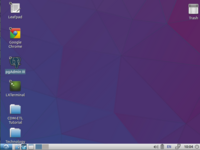
- The ohdsi-in-a-box desktop should appear.
documentation/software/ohdsi-in-a-box.1475784472.txt.gz · Last modified: by mvelez